Build mode is how you put up poles, lights, conveyors, rail, shaft stations and ore processing machines. Press B to open it, press B again to leave.
You cannot open build mode while you ride a vehicle, sit, push a wheelbarrow or swim.
The catalog
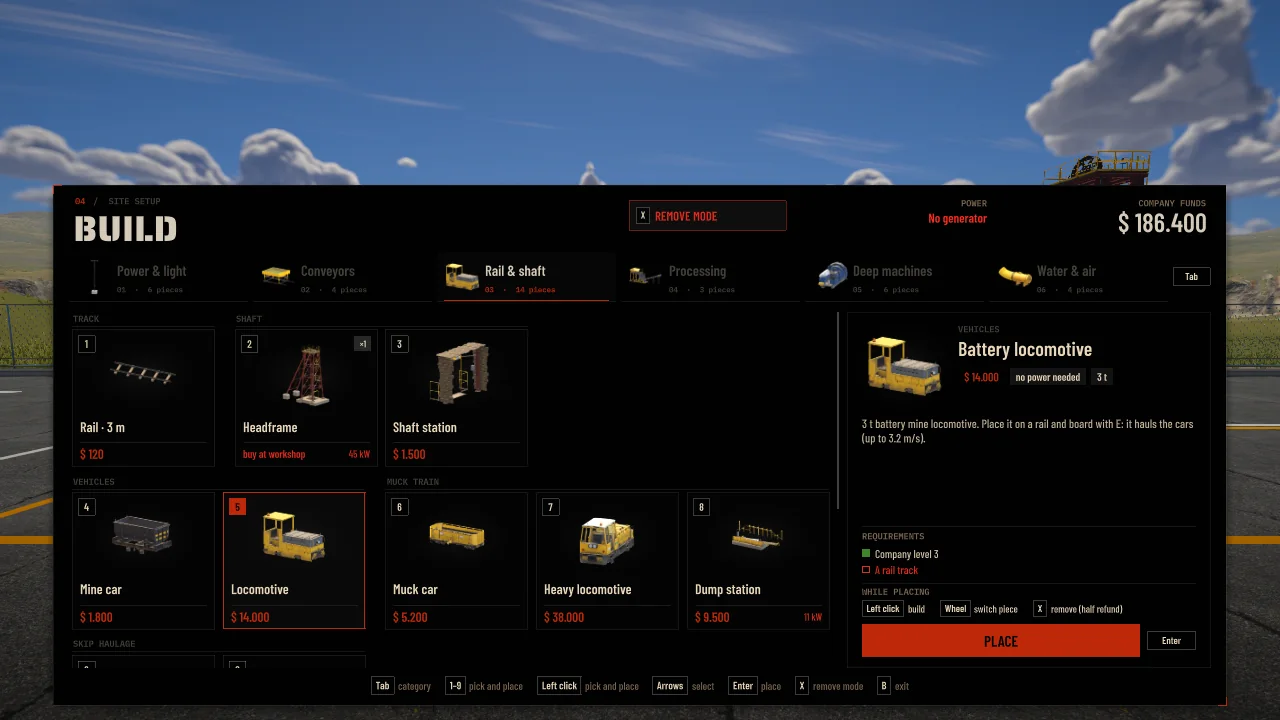
B opens the catalog with a free cursor. Pieces are sorted into tabs:
| Tab | What is in it |
|---|---|
| Power & light | Power pole, floodlight mast, LED strip, wall floodlight (spot), portable generator, compressor |
| Conveyors | Belt line (the drag tool), bucket elevator, and under "Single pieces (advanced)": the conveyor hopper and conveyor head |
| Rail & shaft | Rail (the drag tool), headframe, shaft station, mine car, locomotive, muck car, heavy locomotive, dump station, skip hoist, skip pocket, and single curve and switch pieces |
| Processing | Crusher, sorter, smelter |
| Deep machines | Auto-digger, tunnel boring machine, bridge conveyor, roadheader, underground loader and mine truck kits |
| Water & air | Submersible water pump, settling tank, ventilation fan, spot cooler |
Each card shows the piece's picture, name, price and size. The detail panel shows what it needs: company level, power in kW, the keys that work while you place it, and why it cannot be picked if you lack the level (it says "Requires company lv N"). Some pieces are only unlocked as your company levels up.
Moving around the catalog
| Key | Action |
|---|---|
| Mouse click on a card | Pick it and start placing |
| 1 to 9, 0 | Pick the card with that number |
| Arrow keys, Enter / Space | Move the selection / pick it |
| Tab | Next tab (hold Shift for the previous one) |
| X | Remove mode |
| B | Leave build mode |
Placing a piece
After you pick a piece the catalog closes and a ghost follows your crosshair. Green means it can go there, red means it cannot, and a note under the crosshair tells you why ("Ground too steep", "Requires company lv 4", "Not enough money: $ 3,000 needed" and so on).
| Key | Action |
|---|---|
| Left mouse button | Place the piece |
| Q / R | Turn it by 15 degrees (Shift swaps the direction) |
| Mouse wheel | Change to the next piece in the category, or for some pieces its value: belt slope, rail slope, elevator height, smelter fuel, TBM start slope |
| 1 to 9 | Switch to another piece in the category |
| Tab | Open the catalog again |
| X (hold) | Take down what you look at |
The price is taken when you place the piece. Belts, rail and conveyors are drawn as routes by dragging, not by placing pieces one by one: see conveyors and rail and trains. Machines that need power only work near a live power pole: see the conveyor page for the power rules.
Taking things down
Press X in the catalog to enter remove mode, or hold X while placing. The piece your crosshair is on glows red (amber if it cannot be taken down) and its refund is shown. Click, or hold X, to take it down.
- You get half the price back. A belt is valued by its length, a rail piece by its length, and so on.
- LED strips, spotlights and the portable generator come back to your inventory instead of paying money.
- A headframe pays nothing but comes back as a free kit you can build over another shaft.
- You cannot take down a track piece with a vehicle on it. A headframe cannot be taken down while its cage is away from the top, and the main headframe cannot be taken down at all.
- Taking down also works on the tunnel boring machine and the roadheader: they go back into their kits.
Undo a conveyor or track run
After you finish dragging a belt line or a rail route, Ctrl + Z takes the whole run down again, for 20 seconds. You get the full price back, and any pieces that run had replaced (a straight pair under a new switch, a moved belt head) come back. Ground that the track bed reshaped stays reshaped. Undo refuses if anything on the run has changed since, such as a piece you took down or a vehicle standing on the track. After 20 seconds, use X to take pieces down one by one.
Controls
| Key | Action |
|---|---|
| B | Open the catalog / leave build mode |
| Left mouse button | Place the piece / confirm in remove mode |
| Q / R | Turn the piece |
| Mouse wheel | Next piece, or the piece's slope / height |
| Tab | Catalog / next tab |
| X | Remove mode / take down what you look at |
| Ctrl + Z | Undo the last belt or track run (20 s) |
Tips
- If you cannot afford a piece the ghost still shows. Check the level, the money and the "why not" note before you spend time lining it up.
- When you lay a conveyor or a track, drag first and read the red labels on the ghost; the tool tells you which piece fails and why.