
Three machines dig for you. They share the same controls and the same rules for aiming, so this page covers them together.
| Mini excavator | Excavator (20 t) | Backhoe loader | |
|---|---|---|---|
| Price | $900 | $15,000 | $18,000 |
| Dig depth below its own level | 3.2 m (upgrades: 4.1, 5) | 6 m (upgrades: 7.7, 9.4) | about 4 m and more |
| Bucket | 1.3 m³ (bigger bucket upgrades) | 1.2 m³ (rock bucket: 1.6, 2.0, 2.4 m³) | 1 m³ front loader plus a rear digging arm |
| Moves on | tracks | tracks | wheels, on stabilisers when digging |
| Hard rock | no | with the hydraulic breaker | no |
See driving machines for how to buy them and for keys they share with every vehicle.
Controls
| Key | What it does |
|---|---|
| W S A D | Drive. |
| F | Switch between drive mode (arm folded) and work mode (arm out, upper body follows the mouse). |
| Mouse | In work mode, the upper body turns toward what you look at. |
| Left click | Dig (empty bucket) or dump (full bucket). Hold it to fill or empty only part of the bucket. |
| Right click | Push with the bucket (empty bucket). |
| B | Swap bucket and breaker (20 t with the breaker, work mode, empty bucket). |
| E | Get out. |
Digging
Switch to work mode with F and look at the ground. A glowing ring on the ground, the marker, shows where the bucket will dig. Click and the machine does a full cycle on its own: the upper body slews toward the spot, the arm reaches out, the bucket opens, drags through the ground, curls shut and lifts.
The cut is a bucket-wide slot, not a round hole. It is as wide as the bucket and as long as the drag, and it is as deep as the arm allows, so it takes about the same amount of earth as before but leaves a neat trench. A very small machine may dig a little wider than its bucket so that it can take a full scoop.
Every excavator digs soil, sand, clay, gravel and ore. Harder rock such as limestone and granite needs the breaker, see below.
Hold to fill
By default the click is a held click:
- Dig: press and hold. The bucket scoops while you hold. Let go and the bucket breaks out where it is and lifts, so you can take only a half load. A quick tap still takes a small scoop.
- Dump: press and hold. The bucket opens and pours while you hold. Let go and it stops pouring and closes with what is left. A quick tap pours at least 15 % of the load.
The setting Excavator: hold the button to fill / empty (Sound & controls) turns this off, and then one click does the whole scoop or dump.
The marker and what it tells you
| Marker | Meaning |
|---|---|
| Amber ring | You can dig here. |
| Red ring | The bucket cannot get there. The prompt tells you why. |
| Pale blue ring | A fossil is in the bite. A message reads "A fossil is close, dig by hand". |
The red reasons are "Too deep: the bucket can't get down there", "Too close: the bucket can't get in there", "Too high: the bucket can't reach up there", and, for the backhoe, "The arm can't swing there: the backhoe only slews ±58° behind the machine".
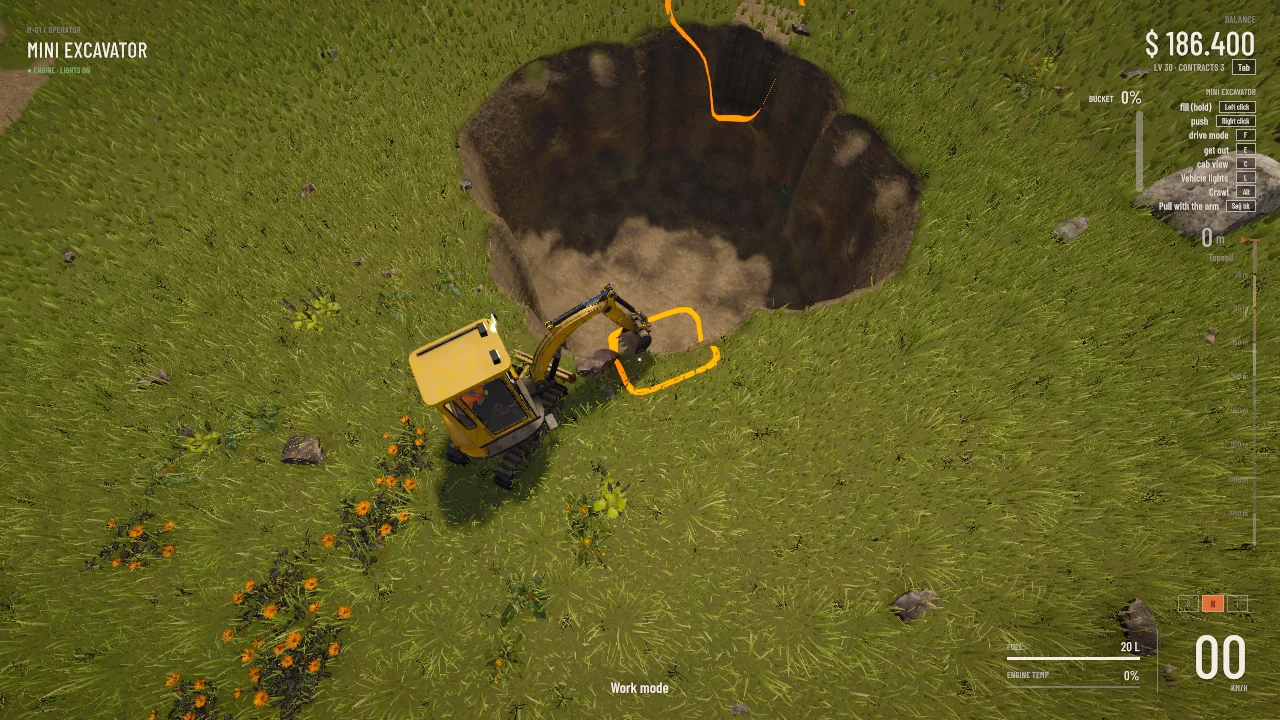
If you click too close to the tracks the prompt says "Too close: the bucket can't open fully here, it digs at the marker", and the bite is moved out to the nearest spot where the bucket can open.
You cannot dig while the machine is moving ("No digging on the move: stop first"). While the bucket is cutting, the tracks hold still; once the bucket is out of the ground you can drive again. On the other hand you can drive and dump at the same time.
Loading trucks and dumpers
With a full bucket, look at the body of a truck or a dumper. The marker jumps to the body and the arm pours into it.
- The truck or skip must be within reach. If the walls are too high for a small excavator the prompt says "Arm can't reach the truck bed: big excavator needed".
- The setting Excavator: auto-aim at truck bodies (default on) helps when your look ray passes just beside the opening: within about 1.6 m of the body, the load goes into the body instead of onto the ground behind it.
- The body's gauge floats over it: how many buckets, how many tonnes, and what the next bucket will bring it to. See trucks and dumpers.
- Look at the ground, or at the dump yard, and the bucket dumps there instead. At the dump yard the load sells on the spot.
- If the bucket cannot dump where you look, the prompt says "The bucket can't dump there: look at the ground or a body".
A full bucket stays full when you drive. The prompt says "Bucket full: take it to the truck, dumper or dump yard."
Pushing
Hold the right mouse button with an empty bucket and the arm turns the bucket round and pushes it along the ground, away from you. It shoves loose soil ahead of it and skims a thin layer off natural ground. It is good for spreading a heap or clearing the ground in front of a truck. See loose material.
The breaker (20 t only)
Buy the hydraulic breaker in the Upgrade tab under the 20 t excavator ($13,500, company level 5). In work mode with an empty bucket press B: the arm lifts, swaps the tool and you get the breaker. Hold left click to hammer. Granite and other hard rock turn into rubble on the ground; switch back to the bucket with B and scoop the rubble up. If the tip cannot reach, the prompt says "Breaker: tip can't reach".
You must empty the bucket first ("Empty the bucket first.").
Driving with the arm out
In work mode the tracked machines can still drive, but the arm will not push through ground it cannot dig. The arm and the upper body stop against hard rock or the camp ground and wait. Soft soil that the bucket or arm touches is scraped off as you roll, and the arm lifts itself to a carrying height while you travel, so a small bump will not trap you.
If the machine is stuck on its arm, drive in drive mode and hold the right mouse button while you drive (W or S, empty bucket, mini or 20 t): the arm plants the bucket on the ground ahead and pulls the machine along, and lifts the tracks out of a soft spot.
The backhoe loader
The backhoe has two jobs.
- Drive mode (wheels): the front shovel is a loader. Left click lowers it; drive into a pile; left click again lifts it, and when it is loaded a click raises it and pours into a truck, a dumper or the dump yard. It steers like a car and has a differential lock on K.
- Work mode (F): stop first. The stabiliser feet come down, the wheels are off duty and the camera turns to face the rear. Now it works like a small excavator with the rear arm. The arm slews up to 58 degrees to each side behind the machine. Press F again to lift the feet and drive on.
If you press F while it is still rolling, you get "Stop first: the stabilisers only go down when the machine is still."
Tips
- Dig the first spot, then move the marker along the trench instead of aiming at a new place each time. Side-by-side bites join up cleanly.
- Hold the click to stop at a half bucket when the truck is nearly full: it is the only way to hit exactly the weight limit.
- Watch for pale blue markers. Fossils dug by machine are damaged, so dig that bite with a shovel or a pickaxe instead.