Rail is how you move large amounts of rock underground without pushing a barrow. You lay a 600 mm track with one drag, put mine cars on it, pull them with a battery locomotive, and tip them where you want the rock.
You need company level 3 for rail, cars and the small locomotive. The dump station, the heavy loco and the muck cars need higher levels (5 and 6).
Laying track
- Open build mode (B), "Rail & shaft" tab, pick "Rail".
- Start from the free end of an existing track, the middle of a track (a switch is put in), or empty floor at least 2.5 m away from other track.
- Hold the left mouse button and drag. The ghost follows the cursor with straight pieces and 22.5 degree curve pieces, and every end meets the next. The first piece that does not work turns red and says why.
- Release to build the whole run. The price is paid once.
A straight piece is 3 m and costs $120, a curve $160, a switch $950 (a spring switch $600 more).
Grade
The track follows the floor, up to 4 degrees. While you drag, the mouse wheel sets the grade by hand in half-degree notches: Q makes it level, R goes back to following the floor. A loaded train cannot climb steeply: the ghost turns orange where the grade is above what a loaded train can pull (about 2.2 degrees for the small train) and the tool warns "A loaded train cannot climb this grade".
When the floor is uneven the tool cuts up to 1.2 m of ground and fills up to 1 m with ballast under the track. "The track would hang in the air" or "Rail runs into the ground" means the cut or fill is too big: change the grade or dig or fill the floor.
Curves
Each curve piece turns 22.5 degrees over 3 m, a radius of about 7.6 m. If the cursor lies inside the turning circle the circle is drawn so you can see how far to move.
Pins and joining
- Right mouse button pins a waypoint, Backspace removes the last one, X cancels the drag.
- Drag onto the free end of another track and a green ring appears with "Joins the line": the two are connected with short pieces of whatever length is needed. If the heights do not fit you get the reason.
- Join the end of a line to its own start and you have a closed loop that trains can run around without stopping at the seam.
- Ctrl + Z within 20 seconds takes the whole run down for a full refund.
Switches
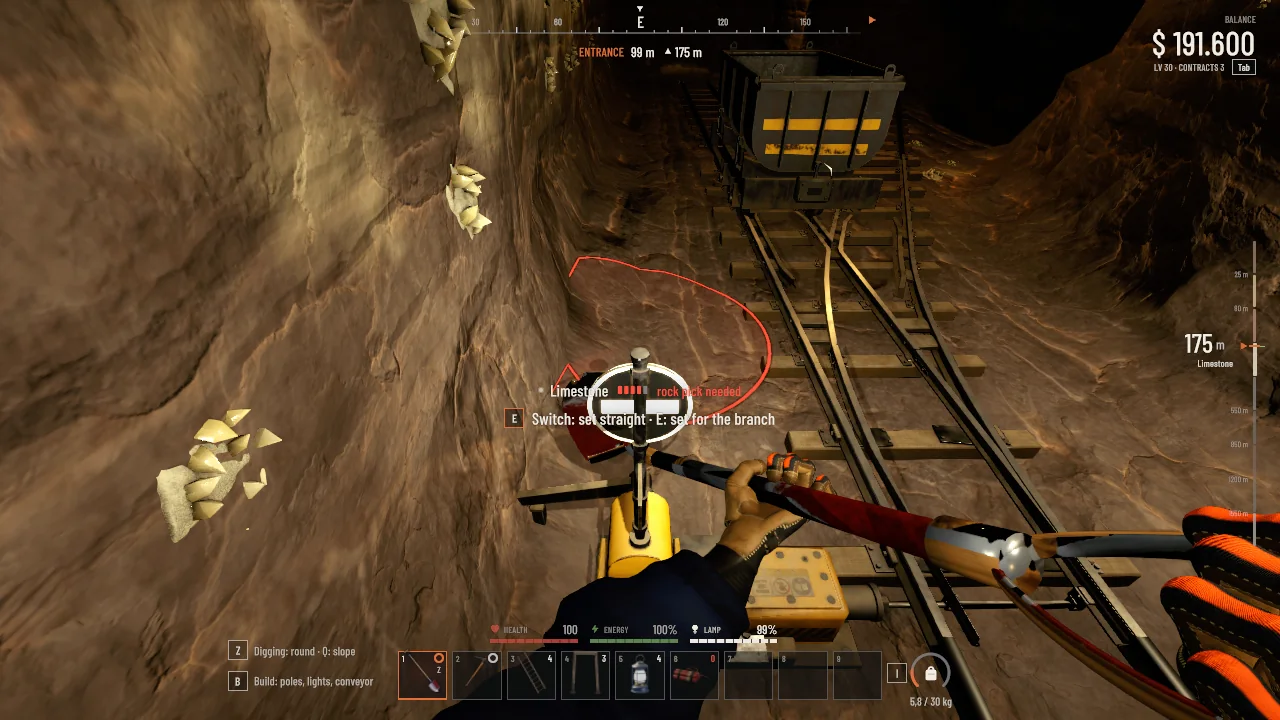
Start a drag from the middle of a track and the tool puts a switch there. The mouse wheel (not dragging) chooses what a branch becomes: a plain switch, a spring switch, or a passing loop (needs at least 40 m of straight track).
- A plain switch stays as you throw it. Look at its stand and press E to throw it. You cannot throw it while a vehicle is on the points.
- A spring switch always sends a vehicle coming from the heel down its right-hand rest leg, and the points go back to it 3 seconds after the last vehicle has left. It has a signal lamp: red when a vehicle is on the points or just beyond them.
- A train that backs into the leg the switch is not set for pushes the points over.
Mine cars
A mine car holds 1 m³ and costs $1,800. Pick "Mine car" in the "Rail & shaft" tab and place it on a track. Shovel, excavator and conveyor can all load it.
Look at a car:
| Key | Action |
|---|---|
| Walk into the end of the car | Push it (it also rolls on its own on a grade) |
| E | Hand brake on / off |
| R | Tip the car to the side away from you (only when it is standing still and loaded) |
| F | Uncouple the coupling on your side (in a train) |
A car tips into whatever is there: a conveyor hopper, a truck body, a machine's feed hopper, the cage of the headframe, the dump yard (which sells it) or the ground. A car that is not on a track says "The car isn't on the rails: lay track under it."
Battery locomotive
The locomotive costs $14,000, weighs 3 tonnes and goes up to 3.2 m/s. Look at it for its battery, brake and how many cars it has, then press E to climb in.
| Key | Action |
|---|---|
| W / S | Throttle forward / back |
| Space | Brake |
| C | Uncouple the cars |
| O | Automatic shuttle (muck train only, see below) |
| E | Get off (stop first: "Stop first (Space: brake)") |
Cars and trains couple when they bump together gently; hit them hard and they bounce apart.
Battery and charging
The battery drains with the throttle: a full battery is about 40 minutes at full throttle. A locomotive that stands still within 30 m of a live power pole charges, from empty to full in about 4 minutes. The prompt shows "(charging)" or "(charging needs a live pole within 30 m)" or "(no charging: breaker tripped)". Look at conveyors for power.
The dump station
The dump station empties a whole train without anybody touching it. Build it ($9,500, company level 5) from the "Rail & shaft" tab at the start of a straight, nearly level 12 m stretch of track. A train rolls over its ramp at no more than 0.8 m/s and every Granby muck car tips in turn into a 3,000-unit bunker beside the track. A feeder moves the rock onto an outlet belt that you connect as the start of a conveyor line (put it by the dump yard and it sells). When the bunker is full the ramp arm lifts and the status says "Station bunker is full".
The station prepares its own ground. When you place it the crew cuts the bay and the far side into the rock or soil (as far as the best tool or machine you own can cut), fills hollows with gravel and levels the floor. The ghost shows the dug and filled volumes ("will dig n m3, fill m m3") and amber columns where. Press Q / R to choose the bunker side. If the track is not straight or level enough where you aim, the station slides along the track up to 12 m to the nearest good stretch; otherwise it tells you what to do: a thing is in the bay, ground is protected, the rock is too hard for your tools, the track needs a longer straight, "press Q while dragging the track to make it level".
Muck trains and automatic shuttles
If you own a tunnel boring machine you can run a muck train behind it. These pieces need company level 6:
- Muck car, a 4 m³ (480 unit) Granby car ($5,200) that tips on its own on the dump station ramp and by hand with R.
- Heavy locomotive, $38,000: 10 tonnes, 24 kN pull, up to 3.3 m/s, regenerative braking and two batteries.
The train hooks onto the TBM's draw bar by itself when it comes within 0.5 m of it, and the TBM's tail conveyor loads the cars one after the other.
In the heavy locomotive press O to start the automatic shuttle: it loads at the TBM, rides to the dump station, tips, and comes back, round after round. Touching the brake takes it back to manual. It stops on its own for a reason that the prompt shows: a flat battery, a broken route, a full station bunker, a loaded grade that is too steep, or you standing within 1 m of the rail (it sounds the horn, slows down and stops 2 m before you). Block signals keep two trains from entering the same stretch of track. For two trains to pass each other, build a passing loop near the TBM; the further the loop from the face, the longer the machine waits ("Passing loop is far from the face: the train has to wait").
Tips
- Keep a loaded train under about 2.2 degrees; put the dump station lower than the face.
- Park the locomotive within reach of a live pole between shifts so it is charged when you need it.