
Every machine in Deep Shaft is bought at the workshop, delivered to the camp and driven in first person or from a chase camera. This page covers the parts that are the same for all of them. The machines themselves are on their own pages: excavators, loader and dozer, trucks and dumpers and the soil roller.
Buying machines
Open the shop at the workshop counter. Machines are in the Machines group of the Buy tab. Each card shows the price, or what you still need.
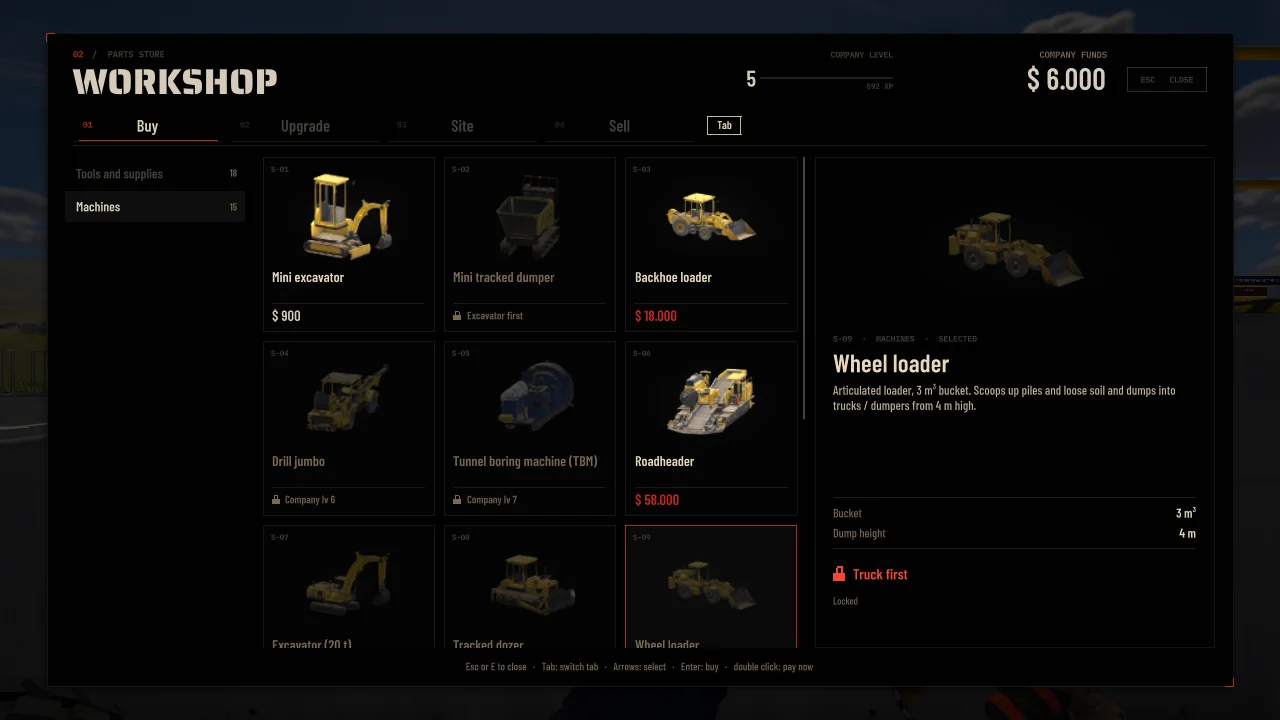
Most machines need two things: an earlier machine and a company level.
| Machine | Price | Needs | Most you can own |
|---|---|---|---|
| Mini excavator | $900 | nothing | 4 |
| Mini tracked dumper | $1,500 | a mini excavator | 4 |
| Tipper truck (4x2) | $4,500 | a mini excavator, company level 2 | 4 |
| Pickup (4x4, 4 seats) | $9,000 | nothing | 2 |
| Tracked dozer | $12,000 | a mini excavator, company level 3 | 2 |
| Excavator (20 t) | $15,000 | a mini excavator, company level 4 | 3 |
| Backhoe loader | $18,000 | nothing | 3 |
| Wheel loader | $18,000 | a truck, company level 5 | 3 |
| Heavy tipper truck (8x4) | $26,000 | a truck, company level 6 | 2 |
| Soil roller | $34,000 | a dozer, company level 3 | 2 |
Buying a second or third machine of the same kind costs the same list price. A new machine appears at its bay in the camp. Further machines of a type go to the nearest free parking spot; if there is none, the card says "No free parking" and you cannot buy another until you free some space.
Upgrades (pump, bigger bucket, stronger engine and so on) are in the Upgrade tab and apply to every machine of that type. They cost 1.5 times their base price.
To get rid of a machine, use the Sell tab. A machine sells for 70 % of its list price, but only while it is parked in the camp and nobody is in it.
Getting in and out
Walk up to a machine and look at it. The prompt reads "Get in the truck" (or the excavator, the dozer and so on). Press E. Press E again to get out. You step out beside the machine on the nearest open ground, never inside a trench wall.
If the company owns more than one machine of a kind, they are numbered ("Truck 2").
Basic controls
| Key | What it does |
|---|---|
| W S A D | Drive. Tracked machines turn on the spot. |
| Mouse | Look around the machine. |
| Mouse wheel | Move the chase camera closer or further away. |
| E | Get out. |
| C | Switch between chase camera and cab view. |
| L | Machine lights on or off. |
| X | Parking brake (trucks and the pickup). Other machines hold themselves when stopped. |
| K | Differential lock (trucks, wheel loader, backhoe loader). |
| Space or left click | Tip the truck body or dumper skip, drop the dozer's load. |
| Y | Refuel at the fuel tank, or call the fuel service. |
| R (hold) | Recover a stuck machine. |
| N | Beacon light on or off (pickup, LHD and mine truck). |
| F1 (hold) | Show every key of this machine. |
| F2 | Hide the whole screen display. |
Machine-specific keys (the excavator's F work mode, the dozer's Q and Z grade, and so on) are on the pages for those machines. Keys can be rebound in the settings.
The vehicle screen
While you drive, the middle of the screen stays clear.
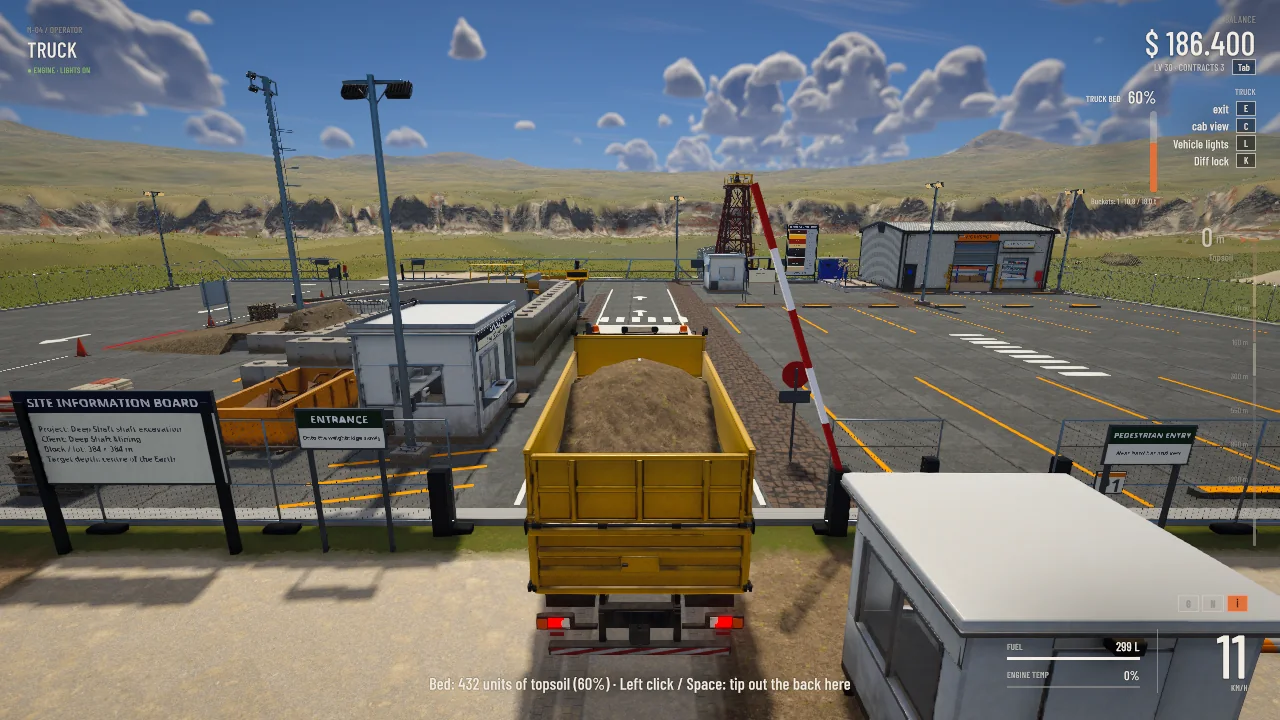
- Key list. The keys you can use right now are listed on the right, under your money, with the machine's name on top. The list shows up to nine rows; hold F1 to see more. A row that stops being useful fades out after a few seconds.
- Load gauge. A vertical bar left of the key list shows how full your bucket or your own body is. When you load another truck or dumper, its gauge floats over that body instead, with a line such as "Buckets: 3 · 11.4 / 18.0 t" and "+1 bucket → 14.2 t" for what the next bucket will bring it to.
- Status and warnings. Short messages sit at the bottom centre: "Wheelspin: ease off the throttle", "Too steep: back off", "Vehicle stuck".
- Dials. Speed, fuel and engine temperature are at the bottom right. If the cab is on screen and shows them itself, the dials are hidden until fuel is below 12 % or the engine runs hot.
The setting Key hints (Sound & controls) has three values: On shows the key list, Short shows only the status line, Off shows nothing.
Cab view
Press C to look out through the operator's eyes. You see the cab, the operator's hands on the wheel or sticks, and the real gauges. In the cab you can look about 120 degrees to each side, and an excavator can look steeply down at its bucket. Your choice is remembered per machine type for the session, so the excavator can stay in the cab while the truck stays on the chase camera.
On the dozer the cab view is keyboard only. The locomotives have no cab view: the driver already sits in his own seat.
Lights and beacons
L turns the lights of the machine you are driving on or off, each machine separately. In daylight they show only a faint glow. At night and underground they light the way. The pickup, the underground loader and the mine truck also have an amber beacon on N.
Fuel
Every diesel machine has a tank. Fuel burns faster when the engine is working hard. When it drops below 12 % you get a warning. At zero the engine stops and you are put out of the seat.
There are two ways to refill:
- Fuel tank. Buy the Fuel tank (2000 L) in the Site tab for $3,000 (company level 2). Drive the machine within 9 m of it and press Y. Diesel costs $1.60 a litre.
- Fuel service. Press Y anywhere else, or standing beside a machine with an empty tank. A truck arrives after 30 seconds and fills it. You pay a $150 call-out fee plus $2.60 a litre.
Electric machines such as the roadheader burn no diesel.
Parking brake and differential lock
The trucks have a real parking brake. If you stand still for two seconds it sets itself and lets go when you give gas. X sets it by hand; it then stays on until you press X again. You see "Parking brake: on" or "off". The other machines have no hand brake: they simply hold when stopped, and pressing X there tells you so.
K locks the differential of the trucks, the wheel loader and the backhoe loader so both wheels pull. Use it when a wheel spins in soft ground. The lock lets go by itself at speed ("Differential lock released itself at speed").
When you are stuck
A machine counts as stuck when you hold the pedal for two seconds without moving, or when it has tipped more than about 20 degrees. The status line then says "Vehicle stuck".
Hold R for half a second. The machine is lifted to the nearest flat spot with room around it, on its own level (the floor of a gallery, the rim of the pit it dug itself into) and set upright, facing the same way. If there is no such spot within about 16 m you see "No flat ground nearby".
Parked machines and holes
Machines you leave parked do not float. If you dig out the ground under a parked machine, it falls and settles onto what is left, tilting if the ground is uneven. Keep this in mind when you trench next to a parked excavator.
Tips
- If a wheeled machine spins in soft fill, ease off the throttle, lock the differential with K and back out. Loose dumped soil is the usual culprit: see compaction.
- The fuel service costs much more per litre than your own tank.
- Hold F1 in any machine when you forget a key.